arLoupe
arLoupe integrates magnification, illumination, imaging technology, and ergonomic design to provide unparalleled all-in-one functionality, precision, clarity, and comfort for professionals.
How to use
Power On
Plug in the device and turn on power. Wait for the ready signal to appear.
Adjust
Place the arLoupe on your head and adjust for comfort, lighting and visibility.
Operate
arLoupe can be used with your glasses on. You can also change magnification as needed.
Key Features
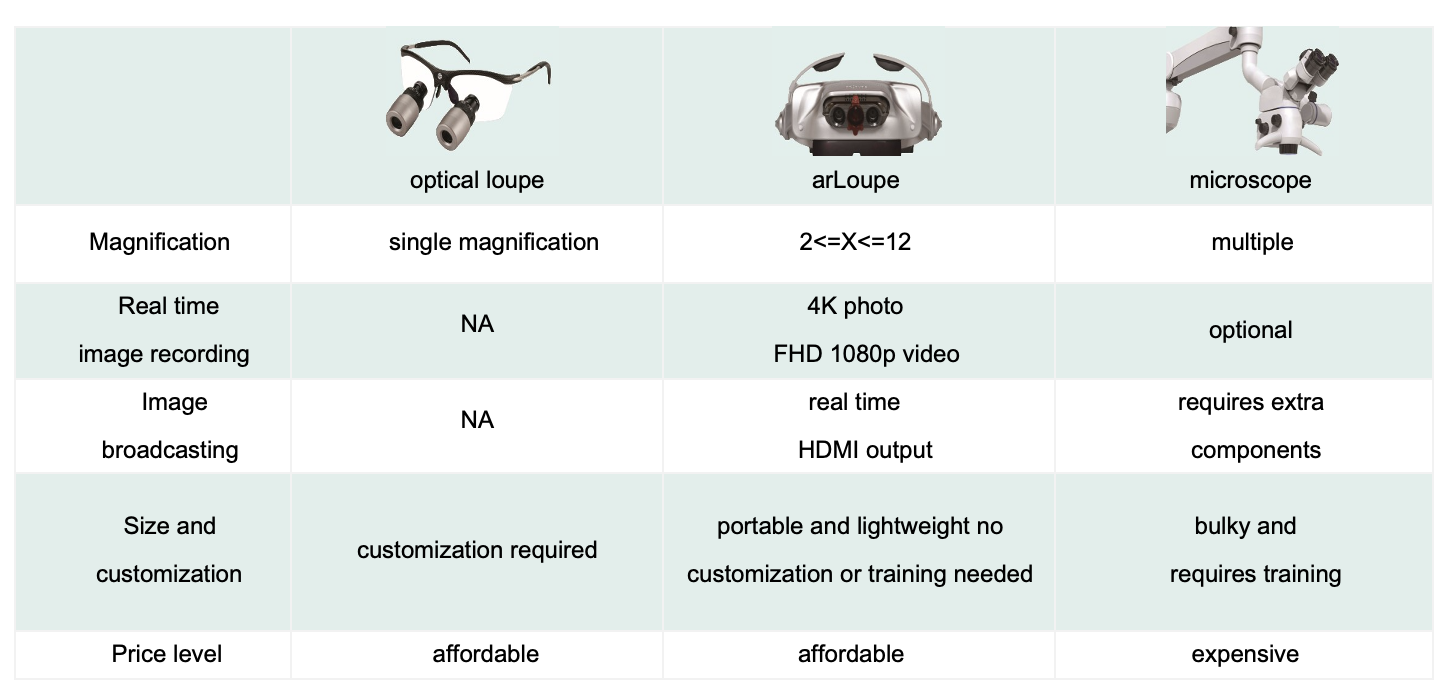
These key features distinguish arLoupe from other loupes.
Real-time Consultation, Training, and Conference Meeting
Connect the headset to an external display for student training or patient consultations. The high resolution video can be displayed locally, or live streamed for video conferencing.


Ergonomic Design to Eliminate Back and Neck Pain During Operations
Our light-weight and ergonomic designed headset eliminates the need to bend or hunch, promoting better upright posture and reducing physical strain during operation.


More Features
6 Hours Battery Life
Designed to last through long procedures with a quick recharge or swap option. Additional batteries available for purchase.
LED Light & Color Temperature Adjustments
Enhance visibility with LED lighting and adjustable color temperature for accurate diagnosis (discoloration, decay, to tissue abnormalities) and precise color matching (composite fillings and prosthetic teeth).
High-Resolution Display
Provides real-time high-resolution imaging to detect fine cracks, enamel texture variations, and small canal openings.
Hands-Free Operation
Intuitive controls to enable near hands-free adjustments, keeping
the focus on the patient
Zoom In/Out
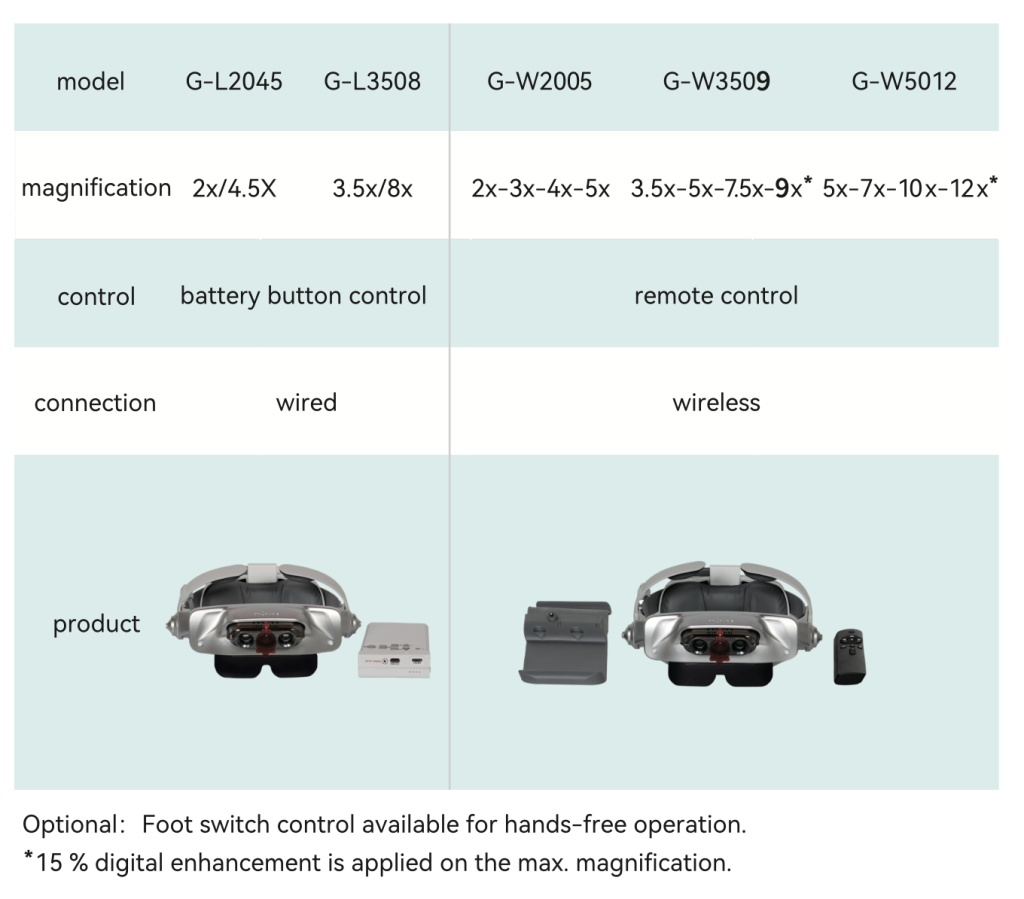
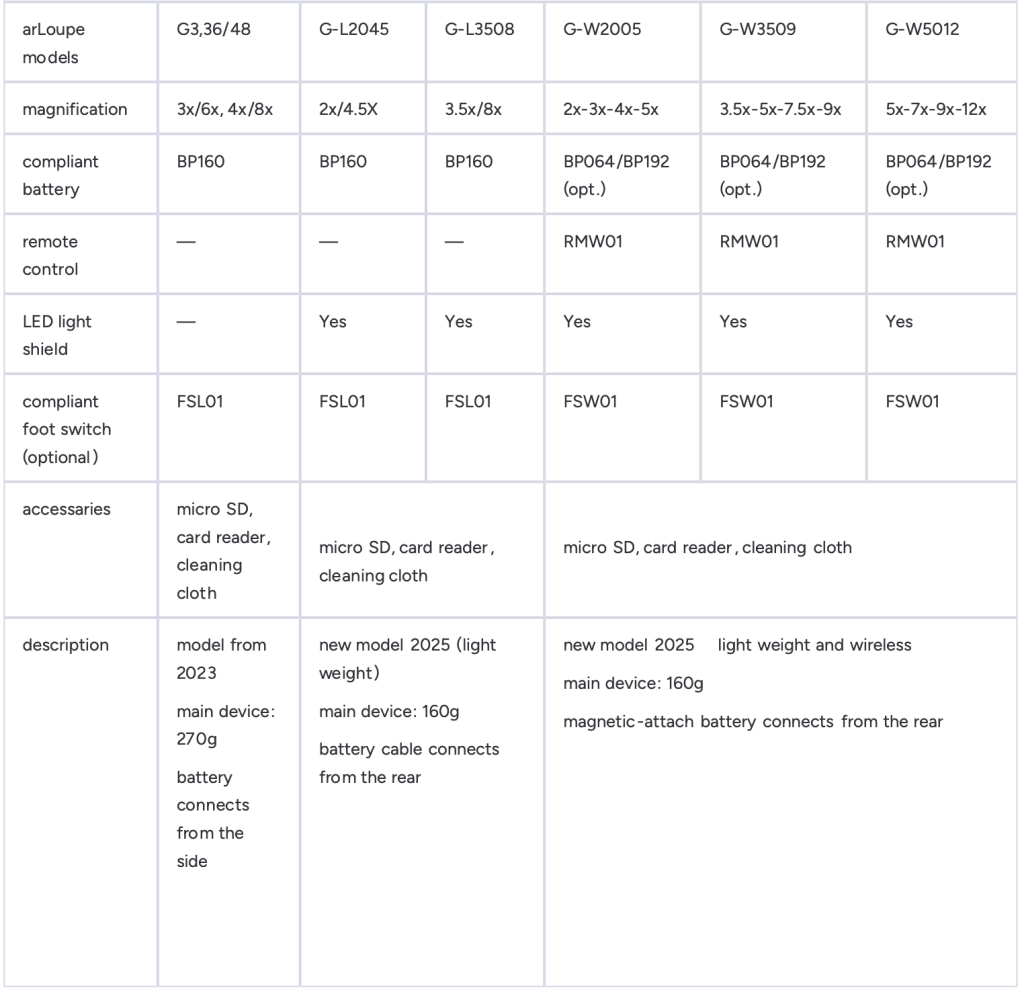
Utilize the zoom feature to effortlessly focus on intricate details. (3x/6x or 4x/8x available)
Record & Screenshot Capabilities
Capture and save what you see for documentation and review purposes at 4k or 1080p Resolution.
Comfortability
Designed for prolonged use with ergonomic features that ensure maximum comfort throughout long procedures.
Comfortability with Glasses
Designed to work with glasses to ensure comfortability and clear vision.
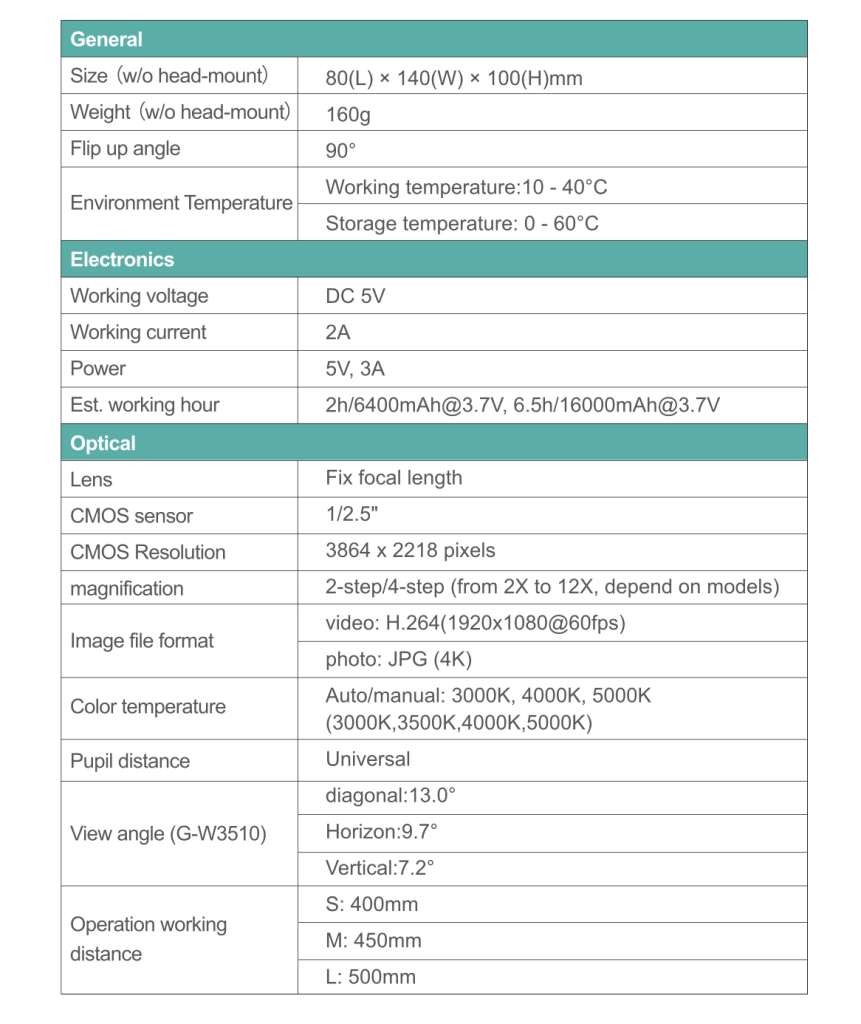
General
| Size (w/o head-mount) | 80 (L) x 170 (W) x 120 (H) mm |
| Weight (w/o head-mount | 240 g |
| Flip up angle | 90° |
| Environment Temperature | Working temperature: 10 – 40°C Storage temperature: -25 – 70°C |
Optical
| Lens | Fix focal length |
| CMOS sensor | 1/2.8″ |
| Resolution | 1937 x 1097 pixels |
| Image file format | video: AVI (1920×1080@60fps) photo: JPG (4K) |
| Color temperature | 3000, 3500, 4000, 5000 |
| Pupil distance | Universal |
| View angle | Diagonal: 9.8° Horizon: 7.3° Vertical: 5.4° |
Electronics
| Working voltage | DC 5V |
| Working current | 2A |
| Power | 5V, 3A |
| Est. working hour | 6h / 16000mAh @ 3.7V |
Frequently Asked Questions
Yes, our product is designed to be compatible with most glasses
1 battery pack can last up to 6 hours.
Yes!
Any monitors/displays that can accept HDMI are supported.
No, the arLoupe does not include wifi for security purposes.
Traditional optical magnifiers require you to look directly at the target through a lens. This causes the field of view (FOV) to decrease significantly as magnification increases, making it difficult to find the target. Additionally, these optical loupes must be customized for each user’s pupil distance.
The arLoupe solves these issues by projecting high-resolution electronic images onto near-eye screens. This design provides a large field of view and eliminates the need for inter-pupillary distance adjustments, making it easy for most people to use. The arLoupe also offers features like first-person perspective video recording, photo taking, and screen projection, which are valuable tools for teaching and medical research documentation.
When you first turn on the arLoupe, you may see an image on one screen while the other remains black. This is usually due to a slight time lag in the system’s startup sequence. Please wait two seconds for the second screen to turn on.
If the problem persists, it may be caused by battery low power. In this case, please replace or charge the battery. If the screen still doesn’t turn on after trying these steps, please contact your agent to return the device to the manufacturer for repair.
The arLoupe uses an advanced micro-OLED screen with “autoluminescence” material, which does not require an external white or blue LED light source. Compared to the micro-LEDs typically used in AR or smart glasses, the amount of blue light from the arLoupe’s screen is very low, making the risk of blue light harm negligible.
The arLoupe is designed with a large “eye-box” (the cone-shaped area between the screen and the eye) to make it easier for users to overlap the field of view (FOV) from both eyes and see a clear 3D image.
Statistically, 90% of people have an interpupillary distance between 57 mm and 66 mm. These users can easily overlap the FOV of both eyes. However, the other 10% of people, whose interpupillary distance is outside this range, may find it difficult to overlap the two fields of view, which can result in seeing double images.
The arLoupe has an HDMI output function to display images on a TV or external monitor. However, to display images on a computer, a video capture card must be used.
Note: There may be compatibility issues with some video capture cards. An HDMI 2.0 standard is required.
If you are using an arLoupe G3 and are unable to project images via HDMI, please check if the red indicator light on the battery control box is on. If the light is off, flip the Type-C cable connector on the battery side and re-insert it into the battery box. The indicator light should then turn on, and the HDMI signal can be output to an external screen or capture card.
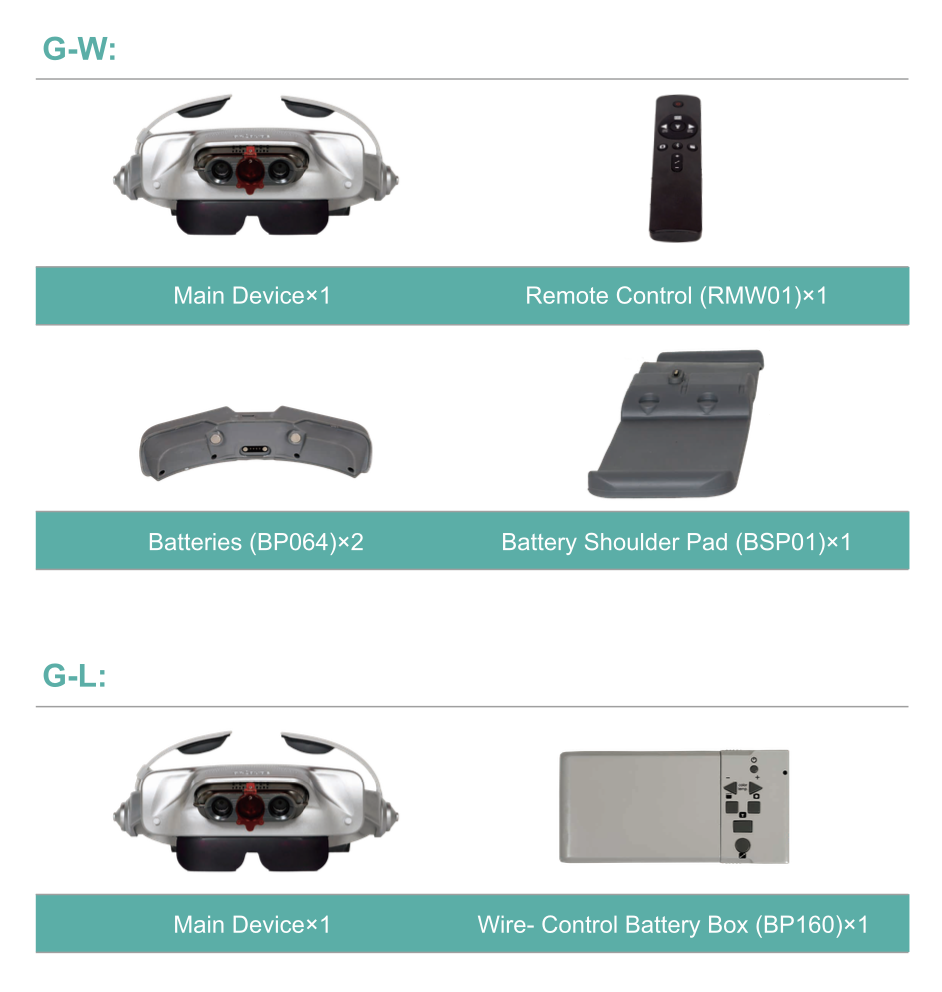
Three different batteries are available for various models:
• BP160: For G-3 and G-L models. Capacity: 16,800 mAh / 3.7 V. Up to 6.5 hours.
• BP064: For G-W models. Capacity: 6,400 mAh / 3.7 V. Up to 2 hours.
• BP192: For G-W models. Capacity: 19,200 mAh / 3.7 V. Up to 7 hours.
The arLoupe captures full images in 4K resolution and saves them as JPG files. When recording videos, it captures the magnified image in Full HD (1080p) at 60 frames per second and saves them in H.264 format. The system automatically saves a new file every 15 minutes and continues recording until the storage space is full.
Unlike traditional medical magnifiers that need to be custom-made, you only need to confirm your “working distance” for the arLoupe. We offer three different sizes—L, M, and S—to fit different body shapes. The recommended sizing chart is as follows:
Size : S
Distance from lens to target (cm) : 40
Working distance/distance from user’s middle fingertip to elbow (cm) : ~40
User height ( cm) : Under 165cm (5’6″)
Size : M
Distance from lens to target (cm) : 45
Working distance/distance from user’s middle fingertip to elbow (cm) : 41~48
User height ( cm) : 166~182 (5’7″ ~ 6′)
Size : L
Distance from lens to target (cm) : 50
Working distance/distance from user’s middle fingertip to elbow (cm) : 49+
User height ( cm) : Over 183 (6′)
Most SD cards are compatible with the arLoupe. If your card isn’t working, it may be due to one of the following reasons:
• The memory card is corrupted.
• The memory card is full.
• The memory card is incompatible with the arLoupe.
Join the Revolution
Take the first step towards superior healthcare delivery. Contact us today to experience the future of medical technology.